All Features
You can back up and manage channels faster while keeping everything organized.
Discover Alphasov's powerful backup and management features.
Start in LITE, expand with PRO, complete with MASTER.
- Every Edition8K Ultra HD Support
- Unlock with PROMulti-Channel Queue
- Only in MASTERHyperSync™ Engine
Available in Every Edition
Core features ready to use right away in every edition, including LITE.
8K Ultra HD Support
From 8K (4320p) down to 1080p, back up YouTube's highest available quality at the source resolution.
Free Format Choice
Save in any format you want — MP4, MKV, WEBM, and more.
Automatic Subtitle Saving
Choose a subtitle option and the available subtitles are saved along with the video. You can also select subtitles in multiple languages.
Smart URL Parsing
Videos, channels, playlists, Shorts, Live — paste any URL and it's recognized automatically.
Smart Filename Generation
The video's upload date is automatically embedded in the filename. No manual file organization needed.
Channel Backup Automation Starts with PRO
The era of hunting for videos is over. Remember only this:
Channel [Register — Select — Start]. Ten seconds a day is enough.
One click
from the channel library. Done.
The time you used to spend finding the channel and preparing URLs every time you back up — the channel library erases that step entirely. Pick a registered channel and press Start. Ten seconds of your time. VAS handles the rest.
Automatic Channel Metadata Saving
On backup, the channel's full video list and metadata are saved automatically.
★ MASTER — even per-video upload dates are recorded automatically, so you can see at a glance which video was uploaded whenBulk Playlist Backup
Back up the videos in a playlist in one run. Folders are created automatically by playlist name, so everything stays organized.
Channel Library — Flat List
Register and manage channels as a clean list. See channel name, URL, and membership status at a glance, and find what you need quickly with search.
★ MASTER — upgraded to tree view, letting you organize channels by groupMulti-Channel Queue
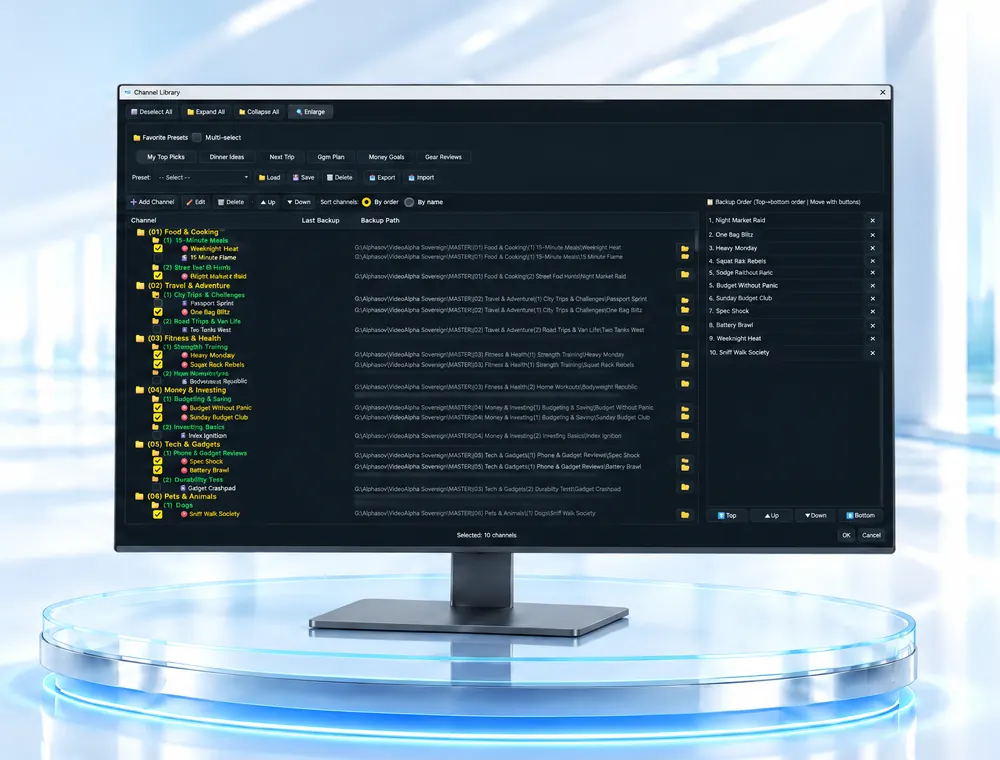
Queue multiple channels and back them up sequentially and automatically. Up to 5 channels can be queued at once.
★ MASTER expands the queue to 10 channels, making it ideal for large-scale backups.Multi-Channel Simultaneous Backup
PRO backs up 2 channels concurrently, MASTER 3.
Membership Channel Backup
Add the membership channels you've joined to handle members-only videos as well.
Long-Running Stable Backup
Designed to automatically manage long-running backup jobs. Once a job starts, VAS continuously manages the backup workflow.
YouTube Sign-In Support
Sign in with YouTube to manage a wider range of videos more smoothly.
Advanced Network Settings
Supports stable connection configuration in specific network environments.
DB Backup & Restore
Safely back up and restore your channel library and settings. No worry about data loss.
Complete with MASTER
Powerful speed and large-scale channel management. Once you experience it, you can't go back.
Overwhelming Speed, No Compromise
HyperSync™ Engine
Would you spend 30 minutes with general tools, or start in 5 seconds with VAS? See the decisive speed gap on a large channel with 2,260 videos. For existing managed channels, backup starts in just 5 seconds.
These tests were measured internally on the same gigabit internet environment. Real-world results may vary depending on PC specifications, network environment, and channel composition (proportion of regular videos vs Shorts, etc.).
Backup processing speed may vary depending on your network environment and channel conditions.
Channel Library — Tree View
Manage channels in a three-tier hierarchy: Group → Category → Subcategory. Organize the channels you use most by group, and spend far less time finding channels and searching for videos. Select and start — that's all it takes to begin a backup.
Per-Channel Save Paths
In tree view, set a separate save folder for each channel. On backup, files are auto-organized per channel, so even backing up dozens of channels keeps files from getting mixed.
Channel Presets
Save your frequently backed-up channel combinations as presets and load them with one click. Export/import for backup is also supported.
Backup Start Date Setting
Selectively back up only videos uploaded after a specific date. Back up only the latest videos efficiently.
List-Only Saving
Extract just the list without saving the videos themselves. Manage channel metadata systematically.